Introduction
DevOps can look huge when you first explore it. You may find hundreds of tools and many career paths.
That can make the first step hard. So, start with simple skills and grow from there.
DevOps connects coding, testing, cloud, servers, and automation. Teams use these skills to release software and keep systems running.
You do not need to learn everything at once. A good plan can help you choose one skill at a time.
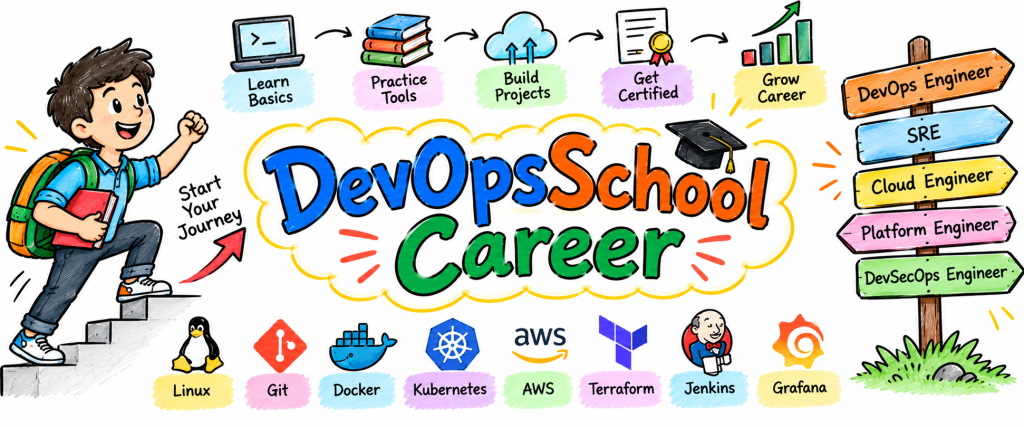
DevOpsSchool.org supports this journey with learning paths, labs, guides, tool resources, certification information, and career content.
You can explore the learning platform here: DevOpsSchool.org
This guide explains how to build your skills from the ground up. It also covers tools, cloud, SRE, Platform Engineering, certifications, and jobs.
Understand the Work Before Learning the Tools
Tools alone do not make someone a DevOps engineer. You first need to understand the work behind those tools.
Imagine a team building a web app. A developer writes the code.
The team stores that code in Git. Then they test the code.
After testing, the team builds the app. Next, they release it to a server.
The team must also watch the app after release. If the app fails, someone must find and fix the issue.
DevOps connects these steps. Automation helps teams repeat them with less manual work.
Start by learning these basic areas:
- Linux
- Networking
- Git
- Shell scripting
- Cloud basics
Learn how Linux handles files, users, permissions, processes, and services. Then learn how networks move data between systems.
After that, practice Git every day. Create branches, make commits, merge changes, and work with remote repositories.
These skills create your base. They also make advanced DevOps topics much easier later.
Design a DevOps Roadmap That Fits Your Learning Speed
A DevOps roadmap should give you a clear learning order. It should also leave room for practice.
Start with Linux and networking. These skills help you understand how servers work.
Next, learn Git and basic scripting. Use small scripts to automate simple tasks.
Then choose one cloud platform. Learn virtual servers, storage, networking, users, and access control.
After cloud basics, learn Docker. Understand how containers package applications.
Move to CI/CD next. Create a pipeline that builds and tests your project.
Then learn Terraform. Use it to create cloud resources through code.
Once you understand Docker, explore Kubernetes. Learn how it runs and manages containers.
Finally, add monitoring and logging. Learn how teams find system problems.
Your basic order can look like this:
- Linux
- Networking
- Git
- Scripting
- Cloud
- Docker
- CI/CD
- Terraform
- Kubernetes
- Monitoring
- Logging
- Security
Do not rush through the list. Understand each stage before moving ahead.
Turn a DevOps Learning Path Into Daily Work
A DevOps learning path works better when you practice every topic.
Reading about Linux can teach commands. Using those commands on a test machine teaches you much more.
The same idea works with every tool. Learn Git and create a real repository.
Learn Docker and package a small app. Learn CI/CD and automate the app build.
Later, connect the project to the cloud. Then use Terraform to create the required resources.
Try this learning pattern:
- Read one topic.
- Try one task.
- Build one small feature.
- Make a mistake.
- Find the cause.
- Fix the issue.
- Write down the lesson.
This cycle keeps your learning active. It also helps you remember skills for a longer time.
Do not wait until you know everything before starting projects. Projects help you discover what you still need to learn.
Grow Through a DevOps Engineer Roadmap
A DevOps engineer roadmap should change as your experience grows. Beginners need different skills from experienced engineers.
| Career Stage | Main Focus |
|---|---|
| Beginner | Linux, networking, Git |
| Junior | Cloud, Docker, CI/CD |
| Mid-level | Terraform, Kubernetes, monitoring |
| Advanced | Security, reliability, automation |
| Senior | Design, scale, cost, leadership |
Beginners should focus on system basics. They should understand how servers, networks, and applications work.
Junior engineers can start building pipelines. They can also deploy container-based applications.
Mid-level engineers can manage infrastructure with code. They can also work with Kubernetes and monitoring.
Advanced engineers need broader thinking. They must consider security, reliability, cost, and automation.
Senior engineers often solve larger system problems. They also help teams choose better technical approaches.
This roadmap gives you a simple way to measure your growth.
Build One Project That Grows With Your Skills
You do not need ten projects to start. One useful project can teach many DevOps skills.
Begin with a simple web application. Store its code in Git.
Next, create a Docker image. Run the application inside the container.
Then create a CI/CD pipeline. Let the pipeline build and test your application.
Move the application to a cloud server next. Use Terraform to create the required cloud resources.
After that, explore Kubernetes. Deploy the application and manage its containers.
Finally, add monitoring and alerts. Check the application when something changes.
You can grow the same project through these steps:
- Build the application.
- Add Git.
- Add Docker.
- Add CI/CD.
- Add cloud hosting.
- Add Terraform.
- Add Kubernetes.
- Add monitoring.
- Add alerts.
- Write project notes.
This method saves time. It also lets you see your progress clearly.
Your project can later become a portfolio example. You can also use it when answering technical interview questions.
Learn DevOps Tools Through Real Problems
The number of DevOps tools can feel overwhelming. You do not need to master every tool.
Instead, learn tools by their purpose.
| Category | Example Tools | Main Purpose |
|---|---|---|
| Version Control | Git | Track code changes |
| Containers | Docker | Run apps in containers |
| CI/CD | Jenkins, GitHub Actions | Automate build and release |
| IaC | Terraform | Create infrastructure with code |
| Automation | Ansible | Automate server tasks |
| Container Platform | Kubernetes | Manage containers |
| Monitoring | Prometheus | Collect system data |
| Dashboards | Grafana | Display system data |
| Logs | ELK | Search and study logs |
Start with tools that match your current project. Do not learn a tool without knowing why you need it.
For example, learn Docker when you need containers. Learn Terraform when you need repeatable infrastructure.
This approach gives every tool a clear purpose. It also makes your learning more practical.
Build Strong Cloud Skills Step by Step
Cloud knowledge can support many DevOps roles. Pick one cloud platform and learn it well first.
Begin with virtual machines. Learn how to create, connect to, stop, and secure them.
Next, study storage. Understand how applications store files and data.
Then explore networking. Learn networks, subnets, routes, and access rules.
After that, study identity and permissions. Learn how users and services access cloud resources.
Now connect cloud skills with DevOps tools. Use Terraform to create cloud resources.
Run your Docker application on the cloud. Then use CI/CD to release new versions.
This approach helps you connect different skills. It also shows how DevOps work happens in real environments.
You can explore other cloud platforms later. First, build one strong foundation.
Use Automation to Remove Repeated Work
Automation can save time, but you should understand the task first.
Suppose you need to install the same software on many servers. Perform the task manually first.
Write down every step. Then use Ansible to repeat those steps.
Terraform follows a similar idea. Learn how to create a cloud resource manually.
After that, use Terraform to create the same resource through code.
CI/CD also follows this pattern. First, understand how developers build and test software.
Then create a pipeline that handles those steps automatically.
Before you automate anything, ask:
- Does this task repeat often?
- Can code handle the task?
- What can fail?
- How can I test it?
- How can I undo a bad change?
These questions help you create useful automation. They also improve your problem-solving skills.
Use the SRE Roadmap to Learn Reliability
SRE means Site Reliability Engineering. SRE teams focus on service reliability and system health.
A good SRE roadmap starts with DevOps basics. Learn Linux, networking, cloud, Git, scripting, and automation.
Then learn monitoring. Study metrics, logs, dashboards, and alerts.
Next, learn incident response. Teams use this process when a service stops working correctly.
You should also learn how teams measure service health. Simple goals help teams understand system performance.
Try a small exercise. Create a simple web service and add monitoring.
Then stop the service. Watch the alert and find the problem.
Restart the service and check the result. Finally, write down what happened.
This exercise teaches an important lesson. Good reliability needs monitoring, automation, and clear response steps.
Explore Platform Engineering as Your Skills Grow
Platform Engineering focuses on tools that help developers work more easily.
A Platform Engineering roadmap can start with Linux, cloud, Docker, CI/CD, and Terraform.
After that, learn Kubernetes. Then explore security, automation, monitoring, and developer tools.
Imagine that ten developers need the same test setup. A platform can give them one simple way to create it.
That setup can reduce repeated work. It can also make team processes more consistent.
Useful learning areas include:
- Cloud
- Kubernetes
- Terraform
- CI/CD
- Automation
- Security
- Monitoring
- Developer tools
- Service templates
Start with a real problem. Build a small solution and test it with users.
Do not add complex features without a clear reason. A simple platform can often solve the problem better.
Compare Tools Before You Commit to One
A DevOps tools comparison should focus on your needs. A popular tool may not fit every team.
First, define the task. Then compare tools using simple points.
| Factor | Question |
|---|---|
| Purpose | What problem does it solve? |
| Setup | How easy is the first setup? |
| Learning | How much time does it need? |
| Cost | Does it fit the budget? |
| Support | Can users find help? |
| Scale | Can it support future needs? |
| Integration | Does it work with current tools? |
Suppose you need a CI/CD platform. Choose two tools and test both.
Use the same small project with each tool. Compare setup, pipeline creation, logs, errors, and integration.
A hands-on test can reveal useful details. So, test tools before making major choices.
Choose a tool because it solves your problem. Do not choose it only because many people use it.
Plan DevOps Certifications Around Your Career
DevOps certifications can support your career plan. They can also help you organize your learning.
Start by choosing a target role. You may want DevOps, cloud, SRE, Kubernetes, or security work.
Next, check the skills that the role needs. Then choose a certification that matches those skills.
Build your DevOps certification roadmap around practical learning.
Follow these steps:
- Pick a target role.
- Choose one useful certification.
- Read the exam topics.
- Learn the required skills.
- Practice with labs.
- Build a related project.
- Take practice tests.
- Review weak areas.
- Prepare for the exam.
Do not collect certificates without building skills. Connect every certification with hands-on work.
For example, use cloud certification study to learn networking and security. Then apply those skills in a project.
This approach gives your certification study a clear purpose.
Prepare for DevOps Jobs With Proof
DevOps jobs can use different titles and skill sets. One company may focus on cloud, while another may focus on automation.
Read job descriptions before you choose your next learning topic. Write down the skills that appear often.
Then compare those skills with your current knowledge.
| Target Role | Skills to Explore |
|---|---|
| DevOps Engineer | Linux, Git, cloud, CI/CD |
| Cloud Engineer | Cloud, networking, security |
| SRE | Monitoring, automation, reliability |
| Platform Engineer | Kubernetes, cloud, automation |
| DevSecOps Engineer | Security, CI/CD, cloud |
Build projects that match your target role.
For a DevOps role, build a deployment pipeline. For an SRE role, build a monitored service.
For a Platform Engineering role, explore Kubernetes and developer tools.
Prepare project stories for interviews. Explain the problem, your approach, the tools, and the result.
Also explain mistakes you made. Tell the interviewer how you found and fixed each issue.
This gives your interview answers a real foundation.
Create Useful Technical Content With Modern Search Methods
Technical content should answer real questions. It should also help readers find clear information.
AEO, or Answer Engine Optimization, focuses on direct answers. Use clear questions and short answers.
GEO, or Generative Engine Optimization, focuses on useful content for generative search. Clear facts and strong structure can help readers understand the topic.
LLMO, or Large Language Model Optimization, focuses on information that language models can understand clearly.
AISEO, or AI Search Optimization, focuses on content for AI-powered search.
You should also follow E-E-A-T. It means Experience, Expertise, Authoritativeness, and Trustworthiness.
Strong technical content can include:
- Step-by-step guides.
- Real examples.
- Case studies.
- Research data.
- Tool comparisons.
- Expert interviews.
- Project lessons.
- Original insights.
- Practical use cases.
Keep the writing simple. Explain technical terms when they first appear.
Most importantly, answer the reader before promoting anything.
Follow a Five-Step Skill Growth Method
A simple framework can keep your learning focused.
Learn one concept first. Understand what it does and why it matters.
Practice the concept with a small task. Try it yourself.
Build something with the skill. Use a real problem as your guide.
Show your work. Keep project code, notes, and results organized.
Grow by taking on harder tasks. Then repeat the same process.
Take Docker as an example. Learn how containers work.
Then create a Docker image. Run the image and test the application.
Next, connect Docker with CI/CD. After that, deploy the container to the cloud.
Finally, document the project. Explain what you built and what you learned.
This framework works for many technologies. It also helps you avoid learning without a clear goal.
Frequently Asked Questions About DevOps Career Growth
What should a beginner learn before DevOps tools?
Start with Linux, networking, Git, and basic scripting.
These skills create a strong foundation for cloud, Docker, CI/CD, and automation.
Can someone start DevOps without advanced programming?
Yes. You can begin with basic coding knowledge.
However, scripting becomes useful as you progress. Shell scripting and Python can help you automate tasks.
Which DevOps tools should I learn first?
Start with Git, Docker, one CI/CD tool, one cloud platform, Terraform, and monitoring.
Practice each tool through a small project.
How does a DevOps roadmap help me?
A roadmap gives your learning a clear order.
It also helps you avoid jumping between unrelated tools.
Should I get DevOps certifications?
Certifications can support your learning and career plan.
Choose them based on your target role and the skills you want to build.
What should I learn for an SRE role?
Learn Linux, cloud, networking, monitoring, automation, scripting, and incident response.
You should also learn how teams measure reliability.
Why should I study Platform Engineering?
Platform Engineering can help you learn how shared developer systems work.
You can explore Kubernetes, cloud, automation, CI/CD, security, and developer tools.
How do I perform a DevOps tools comparison?
Start with the problem you need to solve.
Then compare setup, cost, learning effort, support, scale, and integration.
Which projects can help with DevOps jobs?
Build projects that combine several skills.
A good project can include Git, Docker, CI/CD, cloud, Terraform, and monitoring.
Where can I find DevOps learning resources?
DevOpsSchool.org provides learning resources, guides, labs, tool information, certification material, and career content.
Use these resources with regular hands-on practice.
Final Thoughts
Building DevOps skills does not require one giant jump. You can make progress through small and steady steps.
Begin with Linux, networking, Git, and scripting. Then add cloud, Docker, and CI/CD.
Move toward Terraform and Kubernetes when your foundation feels strong. Later, add monitoring, security, automation, and reliability.
Your projects should grow with your knowledge. Each project can teach you a new skill.
You can also choose a focused career path. SRE, Platform Engineering, cloud, and DevSecOps offer different areas for deeper learning.
Certifications can support your goals when you choose them with care. Practical projects can show how you use your knowledge.
Keep one rule in mind. Learn something, practice it, build with it, fix problems, and repeat.
That habit can turn a large DevOps engineer roadmap into simple daily actions.
DevOpsSchool.org can support your journey with structured learning paths, labs, technology resources, certification information, and career material.
Choose one skill today. Practice it well, then use it as the base for your next step.
